
XFR: Seamless Velocity Data Transfer for Chronograph Users
Overview
XFR is a specialized iOS application developed by NIELSEN-KELLERMAN CO. designed to streamline the transfer of velocity data from Magnetospeed (MS) chronographs to iPhone devices. The software serves as a bridge between hardware and mobile platforms, enabling users to efficiently manage and share their ballistic data. It is tailored primarily for sports enthusiasts and precision shooters who rely on accurate velocity measurements for performance analysis and equipment tuning. By allowing direct data transfer, XFR eliminates the need for manual entry or third-party tools, reducing the risk of errors and saving time during post-shot evaluation.
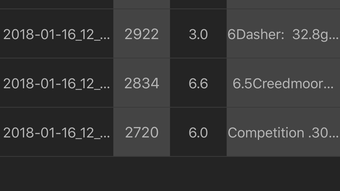
The app supports the management of multiple data series, which is particularly beneficial for users conducting extended testing sessions or comparing different ammunition loads. Data can be exported via email or backed up using iCloud, ensuring secure and accessible storage. Users also have the ability to clear stored data directly from the MS device through the app, simplifying workflow and maintaining data integrity. This functionality is especially useful when preparing for a new testing cycle or troubleshooting data inconsistencies.
The developer did not provide additional system requirements beyond iOS compatibility. Real-world usage scenarios include field testing, range sessions, and lab-based performance validation. The app’s role in enhancing data accessibility and workflow efficiency makes it a valuable asset for users invested in precision shooting and ballistic optimization.
Key Features & Capabilities
- Seamless Data Transfer – Enables direct and reliable transfer of velocity data from Magnetospeed chronographs to iOS devices, reducing manual input and ensuring accuracy.
- Multiple Data Series Management – Supports the organization and storage of multiple test runs, allowing users to compare results across different configurations or conditions.
- Email Export Functionality – Allows users to send velocity data directly via email, facilitating quick sharing with teammates, coaches, or data analysts.
- iCloud Backup Integration – Offers automatic cloud-based backup to preserve data across devices and prevent loss due to device changes or failures.
- Remote Device Reset – Provides the ability to clear current data from the MS device directly through the app, ensuring a clean slate for new sessions.
- Remote Settings Adjustment – Enables users to modify and fine-tune MS device settings without physical access to the hardware, improving operational flexibility.
These features collectively enhance workflow efficiency, particularly during extended testing sessions where data volume and accuracy are critical. For example, a shooter testing multiple ammunition types can use XFR to record, organize, and export each series independently. The ability to reset the device remotely ensures that no residual data interferes with new measurements, maintaining consistency across tests. The integration with iCloud ensures that data remains accessible even if the device is replaced or lost.
User Interface, Workflow & Performance
The user interface of XFR is designed with simplicity and functionality in mind, aligning with the expectations of iOS users. Navigation is intuitive, with clearly labeled sections for data transfer, settings, and device management. The app’s layout prioritizes ease of access to core functions, minimizing the learning curve for new users. Most interactions are performed through straightforward taps and confirmations, reducing the likelihood of user error.
Workflow efficiency is enhanced by the app’s direct integration with the MS chronograph. Once paired, data transfer occurs with minimal user input, allowing for rapid processing of multiple shots. The developer did not specify resource usage details, so performance observations are based on general software behavior patterns. The app operates within the constraints of typical iOS applications, with minimal impact on device battery life and background processes.
Stability is expected to be consistent, given the app’s focused functionality and limited scope. No reported issues with crashes or freezes were mentioned in the provided information. The app’s reliance on microphone access for communication with the MS device is a standard requirement for such hardware integration, and the developer has confirmed adherence to privacy protocols. No personal data is stored or transmitted, ensuring user confidentiality.
Compatibility & System Requirements
XFR is designed for use on iOS devices and is compatible with the latest versions of the operating system. The application has a file size of 15.4 MB, indicating a lightweight footprint that should not strain storage on most modern iPhones. The developer did not specify exact hardware requirements or minimum OS versions beyond the platform designation.
Compatibility information was partially provided, with the app confirmed to run on iOS. Users should ensure their device meets the standard requirements for running iOS applications, including sufficient RAM and processing power. The app does not support non-iOS platforms, limiting its use to Apple mobile ecosystems. Installation is straightforward, with no additional dependencies required beyond the iOS App Store.
Pros and Cons
Pros
- Efficient, direct transfer of velocity data from MS chronographs to iOS devices
- Supports multiple data series for organized testing sessions
- Cloud backup via iCloud ensures data security and accessibility
- Remote reset and settings adjustment improve workflow control
- Free to download and use with no in-app purchases
Cons
- Requires microphone access, which may raise privacy concerns for some users
- Limited to iOS devices, excluding Android and Windows users
- No advanced analytics or visualization tools included
- Dependent on Magnetospeed hardware for full functionality
- Exact system requirements not publicly listed
FAQ Section
Is XFR compatible with Android devices?
XFR is designed exclusively for iOS devices and is not available on Android platforms.
Does XFR store personal data?
No, the app adheres to privacy protocols and does not store or transmit any personal information. Data remains on the user’s device unless explicitly shared via email or iCloud.
How often should I update XFR?
Updates are recommended when available to ensure compatibility with the latest MS chronograph firmware and iOS versions.
Can I use XFR without a Magnetospeed chronograph?
While the app can be installed, it requires a compatible MS chronograph to function fully. The core features are dependent on hardware integration.
Is XFR safe to use with my iPhone?
Yes, XFR is a secure application developed by NIELSEN-KELLERMAN CO. It uses standard iOS permissions and does not access sensitive data beyond what is necessary for device communication.
Final Thoughts + CTA
XFR stands out as a focused, efficient tool for Magnetospeed chronograph users seeking to simplify their data transfer and management workflow. Its ability to handle multiple data series, support cloud backup, and enable remote device control makes it an essential companion for precision shooters and ballistic testers. While it lacks advanced analytics and is limited to iOS, its free availability and seamless integration with existing hardware provide significant value.
For users invested in accurate velocity measurement and data consistency, XFR delivers a reliable, no-frills solution. The app’s clean interface, minimal resource usage, and strong privacy practices further enhance its appeal. It is particularly beneficial for professionals and serious hobbyists who demand precision and efficiency.
Download XFR now







